
Enable traces
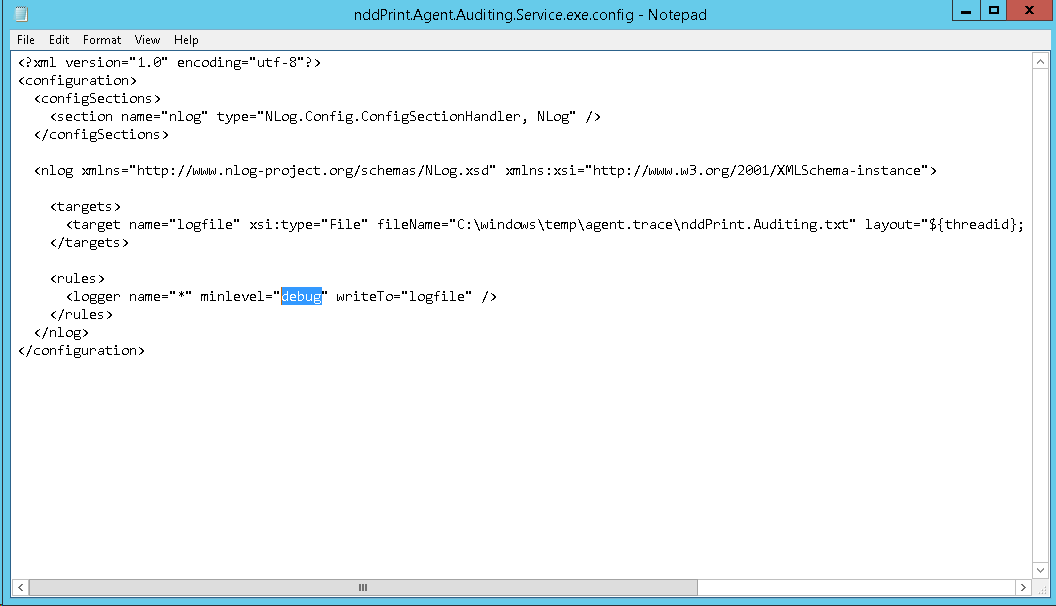
To enable traces > run the notepad as administrator > File > Open > go to the destination folder (installation location) >locate the file nddPrint.Agent.Auditing.Service.exe.config > Open > edit the required information > Save the file > Restart the NDD Print Agent Auditing service
Edit the information:
minLevel: Change the description of this property to one of the following options:
Off: Disabled;
Fatal: It lists the errors that caused an interruption in the solution operation;
Error: It lists errors that occurred at runtime and that generated unexpected conditions;
Warn: It lists situations that occurred at runtime, which are undesirable or unexpected, but not necessarily "wrong";
Info: It lists in detail the steps taken by the solution, at execution time;
Debug: It list in detail the steps taken by the solution, at runtime. Technical information.

ATTENTION
For the settings to be completed, it will be necessary to restart the service (services.msc) NDD Print Agent Auditing.