
General settings
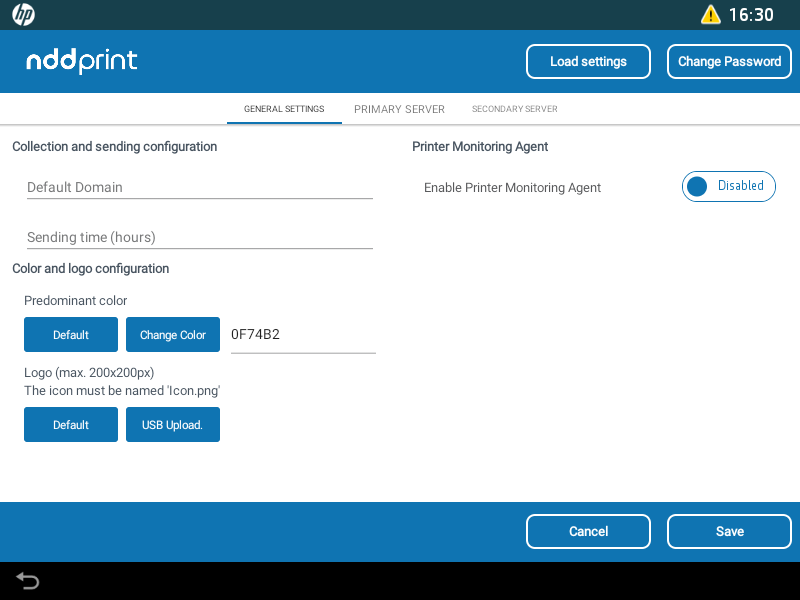
General settings
Collection and sending configuration
Default Domain: enter the default domain assigned to the jobs that its domain was not identified;
Sending Time: enter the time interval value (in hours), where the data captured by the NDD Print Client Collector will be sent to the server (Host, MPS/360 or Orbix).

Due to limitations in the HP SDK, accounting may change in cases where sequential jobs are sent to print with a short period of time.
Printer monitoring agent
Enable printer monitoring agent
Orbix address: address where monitoring data will be sent;
Dealer: inform the name of the NDD partner;
Identification key: enter the identification key provided by NDD.
Due to limitations of the HP firmware, if the printer is configured with the time zone in daylight saving time (DST), there will be a delay of 1 (one) hour between sending (NDD Print Client Collector) and receiving the logs (NDD Orbix).
As an alternative, you can manually configure the printer's time zone by adding 1 (one) hour in the time zone field to compensate.
Color and logo configuration
Predominant color: select the predominant color of the application;
Logo: set an image to be shown as an icon on the equipment panel.