
Proxy configuration
Clicking on the Proxy Configuration option, you will find the following configuration items:
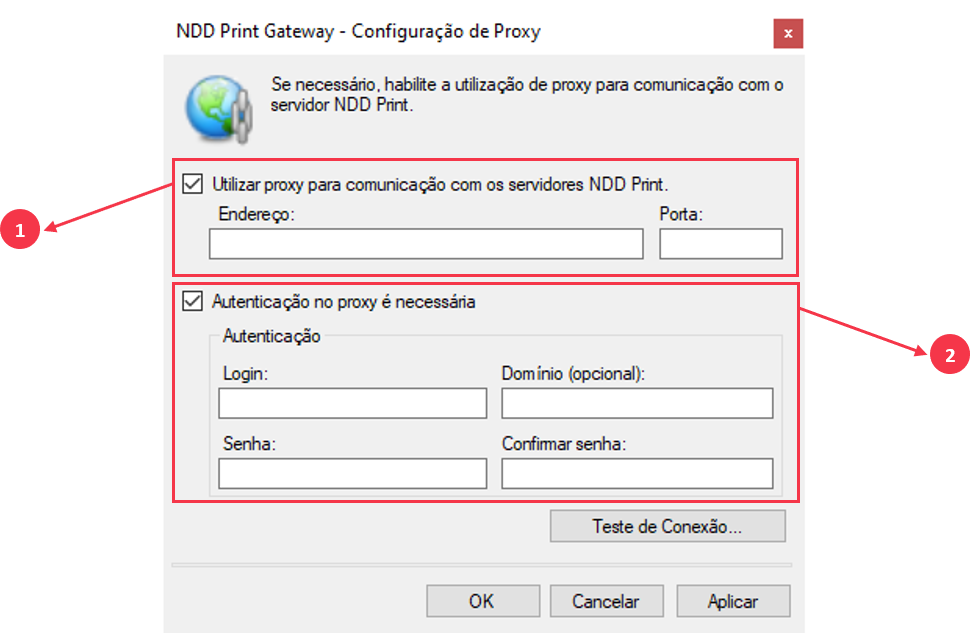
Use Proxy to communicate with NDD Print servers:
Address: Address (IP or Hostname) of the Proxy server;
Port: Port used for communication with the Proxy server;
Proxy authentication is required
Login: User login to perform authentication;
Domain (optional): Authentication domain;
Password: User password configured;
Confirm password: Confirm the configured user password;
Connection test: Tests communication with the Proxy server.

IMPORTANT
This option must be enable only if the Proxy needs authentication to connect to the internet.
To configure the Proxy, follow these steps:
Check the Use Proxy to communicate with NDD Print servers;
Enter the Proxy server address and port;
If authentication on the Proxy server is required, check the Authentication on the Proxy is required and fill in the data;
Login: User login to perform authentication;;
Domain (optional): Authentication domain;
Password: User password configured;
Confirm password: Confirm the configured user password;
Click Apply to complete the configuration;
Use the Test connection button so that the NDD Print Gateway performs a communication test with the Proxy server.