
Bulk addition

Attention
To avoid errors when adding printers in NDD Print MF Canon, you must first perform at least one print and copy job on printers that have a copy function, and at least one print job on devices that do not have this function.
If these jobs are not performed before adding the devices, the process will be interrupted and an information message will be displayed to the user.
Import printers
To use the printer import wizard (bulk addition), follow these steps:
Create import file
You must use a .csv or .txt file that contains the data as shown in the example.
printerAddress;SnmpEntry;systemManagerId;systemManagerPin
172.31.252.13;public;9999999;9999999
CANON451E49;public;1234567;1234567
Where:
Printer address: IP or Hostname from equipment;
SNMP entry: corresponds to the SNMP community configured on the printer, by default it is used "public";
System Manager ID: equipment administrator ID;
System Manager PIN: administrator User PIN code.
Import file
massive add printer
To import the printers > menu Actions > option Import printers
Click
Select file and use the file (.csv/.txt) created;

IMPORTANTE
Enter the data delimiter character in cases where the character that separates the data in the file is different from a semicolon.
If the file contains a header informing the column names, check the option The first line of the import file contains the column names.
After clicking
Next, the system will analyze the information and perform the internal configuration of each equipment;
ATTENTION
In some cases, the device to be imported may not inform the data of the scanning work, as a result the add wizard will inform you that this equipment will only count the copy and print jobs.
Click
Finish.
Export printers
For server backup or migration purposes, you can export the printer list that are added.
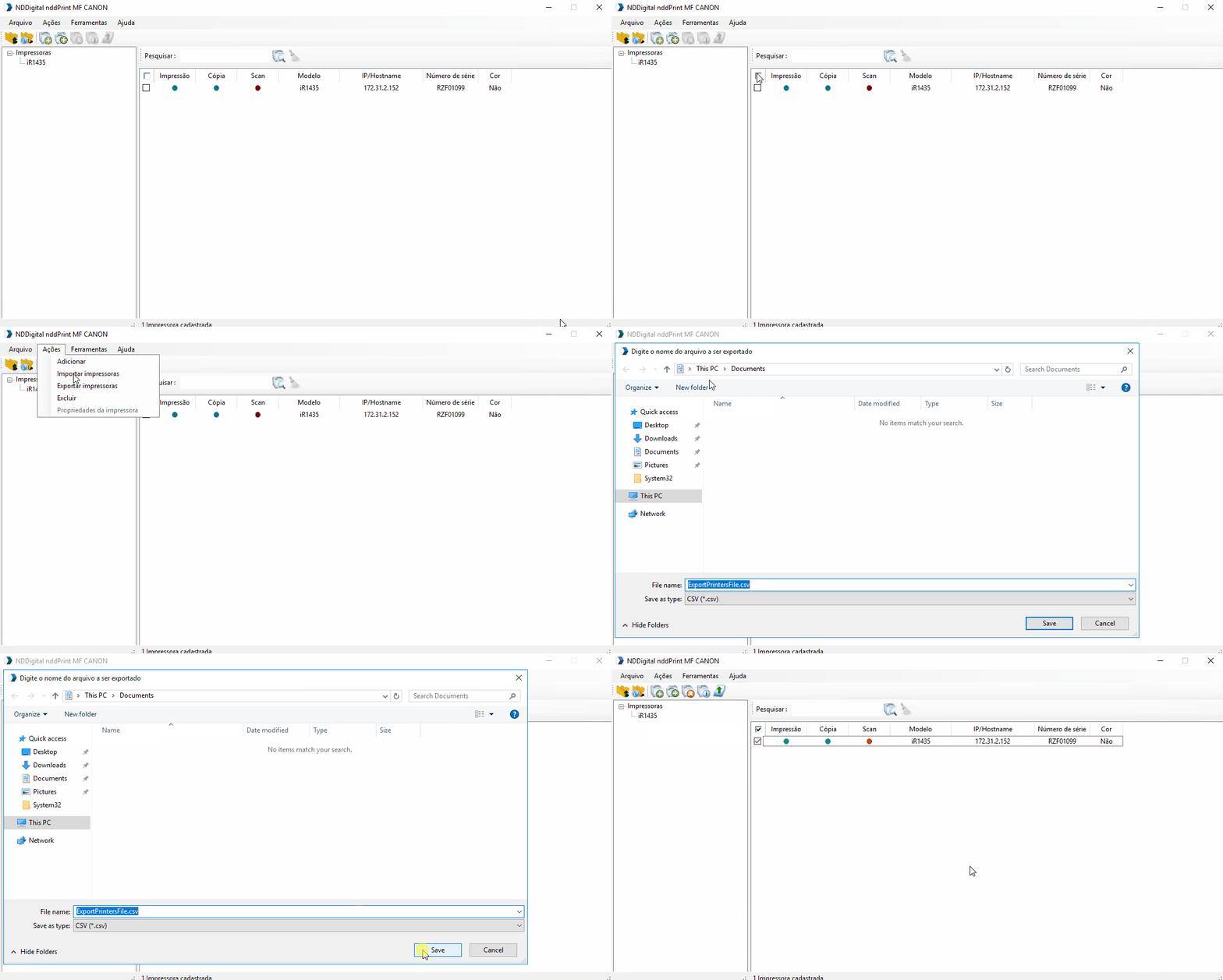
export the printers .GIF
export the printers
To export the printers > select the printer(s) > menu Actions > option Export printers > choose a directory
IMPORTANT
The functions of Import and Export of devices are most used for contingency purposes.