
Logs
The NDD Print MF Brother logs are used to analyze the operation of the component.
Each log entry has a level. And each logger is configured to include or ignore certain levels. A common configuration is to specify the minimum level, where that level and higher levels are included.
For example, if the minimum level is Info, then Info, Warn and Error are logged, but Debug are ignored.
Level | Ordinal | Content |
|---|---|---|
Debug | 1 | Debugging the application behavior from internal events of interest. |
Info | 2 | Information that highlights progress or application lifetime events. |
Warn | 3 | Warnings about validation issues or temporary failures that can be recovered. |
Error | 4 | Errors where functionality has failed or Exception have been caught. |
Off | 5 | Disabled |

Only administrator users can enable or disable logs.
Activate Logs
Open the NDD Print MF Brother installation directory

The default directory is: C:\Program Files\NDDigital\nddPrint\MF\Brother
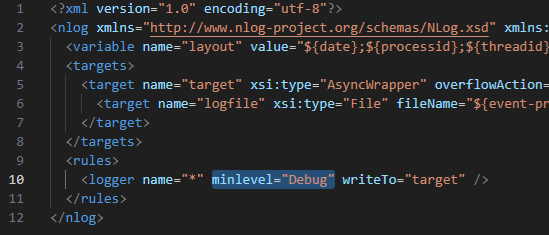
Look for the file nlog.config and open it with a text editor
Look for the logger tag
Change the minlevel property to the level shown in the table above
Restart the NDD Print MF Brother services
The logs will be available in the Trace folder in the installation directory
To deactivate, simply change the minlevel property to off and restart the services.