
Servers
In the Servers tab, you can view, change, and verify communication with the NDD Print Host server (and NDD Print Releaser when used) where the accounting data is sent.
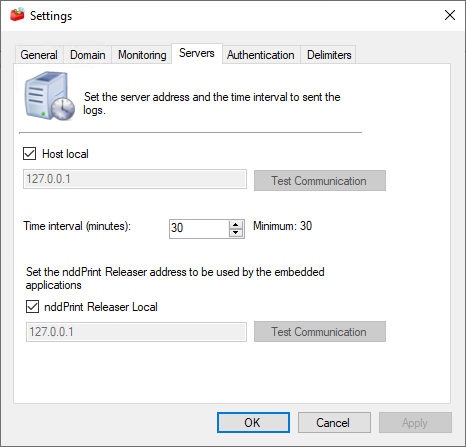
tab Servers
To access this configuration > menu Tools > option Settings > tab Servers
NDD Print Host
In this field will be displayed the address configured in the module installation. If NDD Print Host is installed on the same machine as the NDD Print MF Sharp, no server address will be configured in the installation and the Local Host option will be enabled.
Synchronize
In the Time Interval (minutes) field informing the time interval between each data submission to the NDD Print Host. The minimum configurable time, and also set by default, is 30 minutes.
NDD Print Releaser
Select the NDD Print Releaser Local option if the NDD Print Releaser is installed on the same machine. If it is installed elsewhere, type the IP address of the NDD Print Releaser Server in the available field.
If you want to verify that communication with the server is working correctly, click Test to perform a connection test.