
Sillent Installation
To automate the installation process of this product, you can perform it's silent installation, where it does not require interaction with the user.
To use this installation method, create a text file in the same folder as the install package is at and rename it to "n-MFLexmark.ini". Inside this file, create the installation parameters following the structure below:
.ini file parameters
The functions of each parameter will be described next:
[SETTINGS]
It's just a benchmark to settings. Its insertion is mandatory, but it does not need any assigned value.
InstallPath
Description: Indicates the directory path where the product will be installed. Optional parameter.
Behavior: When missing, the product will be installed in the default directory (Program Files) When performing an update, this parameter will be ignored.
Value: Valid directory path.
n-Host
Description: Sets the IP address or DNS name of the workstation where the n-Host is installed at.
Behavior: Mandatory parameter.
Value: IP Address or DNS name.
SyncQueues
Description: Indicates whether the option to automatically register the printers will be enabled.
Behavior: Optional parameter. When missing, this option will be set as disabled.
Values: Value = 1 to enable. Value = 0 to disable.
AccountCopy
Description: Indicates whether the option to monitor the copy jobs will be enabled or disabled.
Behavior: Optional parameter. When missing, this option will be set as enabled.
Values: Value = 1 to enable. Value = 0 to disable.
AccountFax
Description: Indicates whether the option to monitor Fax jobs will be enabled or disabled.
Behavior: Optional parameter. When missing, this option will be set as enabled.
Values: Value = 1 to enable. Value = 0 to disable.
AccountPrint
Description: Indicates whether the option to monitor Print jobs will be enabled or disabled.
Behavior: Optional parameter. When missing, this option will be set as disabled.
Values: Value = 1 to enable. Value = 0 to disable.
ForceDomain
Description: Indicates the name of the domain to where the jobs will be attributed to.
Behavior: Optional parameter. When missing, the default will be in blank. (forced domain not used).
Value: Name of the domain.
[InstallationLog]
Description: Configuration the generate a file with information about the installation. Is just a reference parameter to create a installation log.
Behavior: It's mandatory if the parameter FilePath is being used.
Values: Doesn't need any value.
FilePath
Description: Indicates the file path of the log. The log file brings information of the installations performed, which helps in the administration, to detect in which computers the software as installed at and where the installation failed.
Behavior: Optional parameter. When missing, the log file will not be created, and if it exists and the path is invalid, it will be created in the same directory as the installer is at, with the name n-MFLexmarkInstall.log.
Value: Valid path;
💡 EXAMPLE 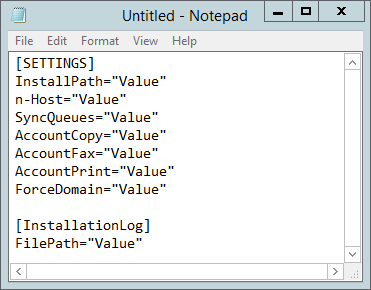 |