User Login Delimiters
Through this feature you can configure delimiters characters for the user accounting. It can be used in situations where the user is accounted as User01.Printer.Domain and the user needs that it's accounted only for User01.
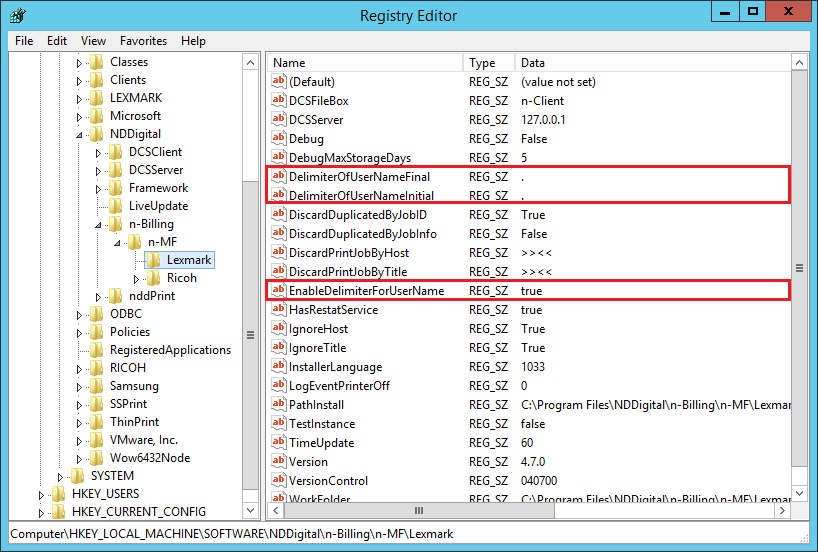
To enable this feature, open the Windows registry and follow the path: HKEY_LOCAL_MACHINE\SOFTWARE\NDDigital\n-Billing\n-MF\Lexmark. Inside this path you must create the following Values:
EnableDelimiterForUserName: Set the Value as True to enable this feature and False to disable it;
DelimiterOfUserNameInitial: Set the delimiter located before the user name, for example, if the user is accounted as Domain.User01, then the delimiter must be a dot (.). This way, the next word on the right of the delimiter will be the user logon.
DelimiterOfUserNameFinal: Set the delimiter located after the user name, for example, if the user is accounted as User01.Domain, then the delimiter must be a dot (.). This way, the next word on the left of the delimiter will be the user logon.
If the user name is between two delimiters, both Values can be used together to delimit the beginning and end of the user name. Remember that only before or after one delimiter, use only one of the String Values: DelimiterOfUserNameInitial or DelimiterOfUserNameFinal.
💡 EXAMPLE Configuration to account a user from Domain.User01.printer. EnableDelimiterOfUserName: True |
In this case, the user to be accounted will be User01, as this is te value located between the two delimiters.