
May 2025
Hello, these are the may 2025 Release Notes of NDD Print, we have a lot of news, and we hope you like it.
Here you can download the latest versions.
See a summary of all updates and click on the links to navigate each one.
NDD Print Host 5.62.3
FIXES
NDD Print Host 5.62.2
FIXES
NDD Print Host 5.62.1
FIXES
NDD Print Host 5.62.0
NEW FEATURES
APPROVALS
NDD Print Client Collector Lexmark 5.11.0
IMPROVEMENTS
NDD Print Client Lexmark 5.16.0
IMPROVEMENTS
NDD Print Client Access Lexmark 5.11.0
NEW FEATURES
NDD Print Client Ricoh 5.12.1
FIXES
IMPROVEMENTS
NDD Print Client Ricoh 5.12.0
NEW FEATURES
NDD Print Portal 360 5.76
NEW FEATURES
FIXES
NDD Print Host 5.60.3
FIXES
APPROVALS
NDD Print MF HP 5.27.6
FIXES
NDD Print Epson 5.7.4
FIXES
Accounting generated from scanning in Digital Shift being assigned to the incorrect user
Authentication failure when using the secondary server function
NDD Print Host 5.62.3
Released on 23 May
Fixes
Selected domain and user not displayed on domain integration screen
How did the problem happen? In the “domain integration” area, the user name was not displayed correctly. In addition, when changing the domain on the “authentication settings” screen, the new domain chosen was not displayed again in the corresponding field when reopening the settings screen.
When did the problem happen? When viewing domain integration and displaying domains on the authentication configuration screen
Where did the problem happen? In NDD Print Host
What was done to fix it? Adjustments were made to the module code
NDD Print Host 5.62.2
Released on 22 May
Fixes
Correction of DomainIntegated fields for embedded devices
How did the problem happen? Problem occurring in the “Integrated Domain” module
What was done to fix it? Adjustments made to the module code
Error when synchronising with local NDD Print Portal 360
How did the problem happen? The problem occurred when using NDD Print Host in conjunction with local NDD Print Portal 360. During the synchronisation process between the modules, there was an error caused by a route not found in the code. This indicated that the application was trying to access a non-existent or misconfigured endpoint, preventing correct communication between the system components.
When did the problem happen? The error was specifically identified during the synchronisation phase of NDD Print Host.
Where did the problem happen? With NDD Print Host
What was done to fix it? The fix involved adjustments to the code to ensure that the application correctly directed requests to the corresponding API.
NDD Print Host 5.62.1
Released on 22 May
Fixes
Error accessing property returned by AuthenticateUserToSession
How did the problem happen? The problem occurred because the embedded device did not return the required property as expected. This indicated that, during the communication process between the embedded device and NDD Print Host, the property responsible for providing specific data was not being correctly recognised or processed, generating failures in the operation.
When did the problem happen? The error occurred when the embedded device authenticated with the NDD Print Host.
Where did the problem happen? The failure occurred directly in the embedded device, the component that, when attempting to connect to the NDD Print Host, was unable to correctly provide the expected return from the property.
What was done to fix it? The ScanDirectory property was corrected, ensuring that it would respond correctly within the embedded device's communication flow. After the adjustment, authentication resumed as expected, allowing the embedded device to communicate correctly with the Host and eliminating the failure that compromised the synchronisation between the systems.
NDD Print Host 5.62.0
Released on 19 May
New features
Host - Integration with Azure AD / Microsoft Entra ID domains
What is the new feature? The new feature consists of the integration of Microsoft Entra ID domains with NDD Print Host.
What is the benefit of the new feature?
Enhanced Security and Risk Reduction: Integration with Azure AD provides an advanced level of protection, using federated authentication to prevent unauthorised access and ensure greater security for corporate data.
Increased Productivity: With less time wasted on authentication and access issues, users can focus on their core tasks, optimising workflow and improving operational efficiency.
Agile and Simplified Integration: Companies already using Azure AD can adopt this solution quickly and intuitively, without the need for complex configurations, ensuring a smooth transition.
Unified authentication for a more fluid experience: With this integration, users will be able to use their Azure AD credentials to access both NDD Portal 360 and NDD Print Ricoh Customer. This eliminates multiple logins, providing simpler and more practical access on a daily basis.
How does the new feature work? Unlike other forms of domain integration, integration with Microsoft Entra ID domains is managed directly by NDD Print Portal 360. The NDD Print Host only needs to define the type of authentication you want (PIN, Secure PIN or Physical ID), the ‘Access Control’ screen and view the description indicating the presence of an integrated Microsoft Entra ID domain on the ‘Domain Integration’ screen.
Approvals
Printers approved for network meter and supply collection
LEXMARK XC9235
NDD Print Collector Lexmark 5.11.0
Released on May 14
Improvements
Lexmark Client Collector compatibility with SNMP v3 protocol
We have reinforced product security by making the Lexmark NDD Print Collector embedded solution compatible with the SNMP v3 protocol.
This initiative ensures encrypted and authenticated data communication between devices, minimising vulnerabilities and guaranteeing greater integrity, reliability and compliance with information security best practices.
Configuration can be found at: https://helpcenter-nddprint.ndd.tech/pt/manual-nddprint-clientcollector-lexmark/Current/configurar-ndd-print-client-collector

Before configuring SNMP V3 on the Lexmar NDD print Collector module, SNMP V3 must be configured in the printer's native configuration.
NDD Print Collector Lexmark 5.16.0
Released on May 14
Improvements
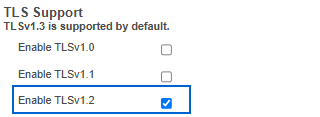
Lexmark Client compatibility with TLS 1.2 protocol
Lexmark NDD Print Collector module compatible with TLS 1.2 security protocol
You don't need to enable the 1.2 protocol in the Lexmark NDD Print Collector module, but you must configure TLS 1.2 in the printer's native configuration.
Example: Lexmark CX860
Configuration path: Settings > Network/Ports > TCP/IP and TLS Support
Lexmark NDD Print Client Access 5.11.0
Released on 14 May
New features
Lexmark - Integration with Azure AD / Microsoft Entra ID domains
What is the new feature? The new feature consists of the integration of Microsoft Entra ID domains with the NDD Print suite of solutions, allowing users to log in to embedded devices using their Azure AD credentials.
What is the benefit of the new feature? The integration provides a more secure, simplified and seamless authentication experience, in line with modern identity management practices.
How does the new feature work? The new feature allows users to use Microsoft Entra ID for authentication directly on the MFP panel. The process works as follows:
Authentication Methods: Users will be able to access the system using a PIN or Card, ensuring greater security and convenience.
Credential Association: A QR Code will be displayed on the printer panel, allowing users to associate their PIN or Card with their Microsoft Entra ID account.
Comments? The configuration required to integrate the NDD Print suite with Microsoft Entra ID domains will be performed in the NDD Print Portal 360 module, replacing the previous model, which used NDD Print Host for on-premises domains. For this type of domain (on-premises), the same procedures for configuring the integration continue.
NDD Print Client Ricoh 5.12.1
Released on 14 May
Fixes
Document titles too close to the dividing line in public documents
How did the problem happen? Whenever a user accessed a folder within public documents, the file titles were displayed without adequate spacing, appearing ‘glued’ to the dividing lines separating the documents.
When did the problem happen? When accessing public documents and opening a folder, the document titles appear too close to the line separating one document from another, making viewing less clear and making it difficult to identify files.
Where did the problem happen? The problem occurs in NDD Print Client Ricoh, specifically in the Public Documents > Public Folder section of the document display interface.
What was done to fix it? Adjustments were made to the module's source code.
Improvements
Improvements to messages on the Ricoh NDD Print Client panel
What is the objective? To improve the user experience by presenting information in a clear and accessible manner, facilitating understanding and providing effective guidance on faults and corrective actions. In this way, we seek to increase operational efficiency and reduce dependence on technical support.
What has been done? Improvements have been made to the visual communication of the printer panel, which now displays clear and intuitive messages about the communication status between the control panel and the network service after hibernation.
What will be affected?
Communication
The communication flow between the panel and the network service will be adjusted, ensuring greater stability and reliability in the transmission of information.
Panel messages
The messages displayed on the panel will be updated to be more specific and objective, in line with best user experience (UX) practices.
Updated messages:
New message for communication error between screen and network card:
Please wait while communication between the printer and the network is re-established. Try again in a few moments.
New message for printer and server communication error:
Unable to establish communication with the server (192.168.xxx.xxx). Please try again in a few moments
NDD Print Client Ricoh 5.12.0
Released on 14 May
New features
Ricoh - Integration with Azure AD / Microsoft Entra ID domains
What is the new feature? The new feature consists of the integration of Microsoft Entra ID domains with the NDD Print suite of solutions, allowing users to log in to embedded devices using their Azure AD credentials.
What is the benefit of the new feature? The integration provides a more secure, simplified and seamless authentication experience, in line with modern identity management practices.
How does the new feature work? The new feature allows users to use Microsoft Entra ID for authentication directly on the MFP panel. The process works as follows:
Authentication Methods: Users will be able to access the system using a PIN or Card, ensuring greater security and convenience.
Credential Association: A QR Code will be displayed on the printer panel, allowing users to associate their PIN or Card with their Microsoft Entra ID account.
Comments? The configuration required to integrate the NDD Print suite with Microsoft Entra ID domains will be performed in the NDD Print Portal 360 module, replacing the previous model, which used NDD Print Host for on-premises domains. For this type of domain (on-premises), the same procedures for configuring the integration remain the same.
NDD Print Portal 360 5.76
Released on 12 May
New features
Portal 360 - Integration with Azure AD / Microsoft Entra ID domains
What is the new feature? The new feature consists of the integration of Microsoft Entra ID with the NDD Print suite of solutions, allowing users to log in to embedded devices using their Azure AD credentials.
What is the benefit of the new feature? The integration provides a more secure, simplified and seamless authentication experience, in line with modern identity management practices.
How does the new feature work? Users will be able to use their Azure AD credentials to access clients installed on printers, where they must first configure some settings in NDD Print Portal 360. Unlike integrations with on-premises domains, integration with Microsoft Entra ID domains must be configured in NDD Print Portal 360, and no further configuration is required in NDD Print Host.
Fixes
Digital Shift - Scanning to SharePoint – Unable to view SharePoint sites and folders
How did the problem happen? When using the NDD Print Digital Shift solution, it was impossible to scan to Microsoft SharePoint. Even after creating another directory in the partner's SharePoint, the problem persisted.
When did the problem happen? When attempting to scan, the flow did not operate correctly.
Where did the problem happen? Digital Shift integration with Microsoft SharePoint
What was done to fix it? Information about application registration and SharePoint configuration was added to the NDD print manual. The modified page is as follows:
https://helpcenter-nddprint.ndd.tech/en/manual-nddprint-portal360/Current/digital-shift
Job export report showing an error
How did the problem happen? The error occurs when exporting the print job report on the server. If the print details and/or printer information options are selected, the report is not generated. If these options are not selected, the report is generated, but the columns appear in a different language than expected (Spanish).
When did the problem occur? The problem occurs when exporting the print job report on the server, specifically when setting the print details and printer information options.
Where did the problem occur? Reports area
What was done to fix it? The script responsible for translating the fields was adjusted to ensure that the data is displayed correctly in the expected language.
NDD Print Host 5.60.3
Released on may 12
Fixes
Excessive printer cache requests
How did the problem happen?
When did the problem happen?
Where was the problem?
What was done to fix it?
Approvals
Approved printers for collecting counters and network supplies
HP DESIGNJET T795 44in
LEXMARK CS963e
HP LASERJET PRO M404dn
LEXMARK CX961se
RICOH IM 4000
KATUSHA M240
LEXMARK XC4140
BROTHER DCP-L5512DW
EPSON L4260
NDD Print MF HP 5.27.6
Released on may 07
Fixes
Alert not displayed on the interface when the password is incorrect
How did the problem happen? After a factory reset, a device registered in the MFHP administration interface retains the ‘success’ status. However, when the printer is reset, the password is undefined (blank), whereas it should display an error status because the password is different from the one used when the device was registered in MF HP.
Where did the problem happen? On the MF HP administration screen
What was done to fix it?
Correction to prevent printer duplicationImplementation of validations to prevent two printers from being added to the system incorrectly, ensuring greater accuracy in device management.
Adjustment to incorrect password setting Modification to password validation flow: when an incorrect password is identified, the system will allow correction and then mark the configuration as pending addition.
Failure to add printers in bulk by hostname
When did the problem happen? When adding printers in bulk in MF HP
How did the problem happen?
Printers not showing up in the HP MF interface;
When attempting to delete pending printers, a message was displayed stating that the action could not be performed;
Printers could not be exported;
When using ‘Search’, the following error was displayed: OBJECT REFERENCE NOT SET TO AN INSTANCE OF AN OBJECT
Where did the problem happen? HP MF
What was done to fix it?
Adjustment to the method for returning addresses from the hostnameRefinement of the logic for obtaining addresses from the hostname, ensuring greater accuracy and efficiency.
Hostname verification during database accountingImplementation of a validation to identify whether an address corresponds to a hostname before accounting in the database, ensuring adjustments as necessary.
Increased number of attempts to search for IPs for hostnames Optimisation of the hostname resolution process, increasing the number of attempts to improve the success rate in obtaining the IP.
Correction in the cache dictionary of authenticationContextId Standardisation of identifier storage, ensuring that all processes use hostname instead of IP, correcting the card logout problem.
Fixing the Authentication ID OxpdAdjustment to ensure consistency in authentication, maintaining the same fixed ID throughout the process.
Correction in the dictionary PrinterStatusImprovements in printer status handling, improving system reliability.
Validation to add backup printer in pending mode Implementation of verification to ensure that printers in pending mode without a hostname are correctly added as backup.
NDD Print MF Epson 5.7.4
Released on may 07
Fixes
Accounting generated from scanning in Digital Shift being assigned to the incorrect user
How did the problem happen? When scanning with Digital Shift.
When did the problem happen? When using nddPrint Digital Shift for scanning, the user is not identified in the Portal 360 report and is recorded as ‘Unknownuser’. In standard scan mode, without Digital Shift, identification occurs correctly.
What was done to fix it?
Log in to the device to ensure that the user name is obtained in the scan via Digital ShiftImplementation of a validation in the device login process, ensuring that the user name is correctly identified during scanning via Digital Shift.
Authentication failure when using the secondary server function
How did the problem happen? Solution NDD Print was configured to use the secondary server, but when the primary server was disabled, the following errors were displayed
By badge: Browser timeout (EC - 999) - please try to reload the page or contact your administrator
By username and password: 500 internal server error (EC - 299) - please try to reload the page or contact your administrator
Where did the problem happen? When authenticating, by badge or by username and password
What was done to fix it?
Addition of the variable Var POSTGRES_DATA_DIR Inclusion of the environment variable to define the PostgreSQL data directory, ensuring greater flexibility in configuration.
PostgreSQL update to version 16.8.1Upgrade to the new version, including increasing max_connections to 7000, improving scalability and simultaneous connection capacity.
Correction in card and token validation during registrationAdjustments to credential verification to ensure greater consistency and reliability in the registration process.
Added timer to prevent concurrent calls when updating the cardImplementation of a control mechanism to prevent conflicts and improve the stability of card updates.
Primary server definitionAdded support for explicit configuration of the primary server, ensuring proper routing of processes.
Logic for defining the secondary serverImplementation of rules to correctly identify and configure the secondary server, optimising redundancy and load distribution.
Handling to prevent exceptions in FinaliyRelationShipAdjustment to the logic to prevent unexpected errors and improve the stability of the functionality.
Use of differentiated token for secondary serverImplementation of a new authentication model, ensuring that the secondary server uses its own token for specific operations.